Chat sorting improvement: The chat sidebar now automatically sorts conversations based on the most recent activity or edits, rather than the creation date.
Custom bot names retained: Custom bot names now persist in chat responses and no longer revert to the underlying model name.
Secure project access: Editors can no longer use project-owner tokens to remove or downgrade owners from unrelated projects.
Photo response fix: Users can now regenerate responses that include a photo without the chat breaking or disappearing. No need to refresh.
Feature Enhancements
Improved sharing limits: You can now share your project with up to 30 users at once, up from the previous limit of 10, making collaboration faster and easier.
New Models Available
We’ve expanded our model lineup with the latest additions: GPT-4.1 Nano and o3.
Invite List Now Saves Automatically (MyAI Builder) We fixed a previous issue where navigating away from the sharing screen would clear a user’s invite list. Now, any emails added remain saved until they click Invite, even if they leave the screen and return later.
Project Copy Freezing Fixed Copying a project with a duplicate name now shows a clear error instead of freezing.
Enter Key Behavior Updated Pressing Enter when renaming a project now correctly submits the form, rather than closing the screen.
Owner Role Dropdown Removed The "Owner" field in the Share screen is no longer clickable, since it can’t be changed. This prevents confusion.
Feedback Button Error Resolved Thumbs up/down buttons now work properly in both ASU GPT and MyAI Builder without showing error messages.
Chat Sidebar Instantly Updates New chats now appear immediately. Deleted chats are also removed instantly — no page refresh required.
Top K Value Fix The “Top K” setting now has a minimum value of 1. Setting it to 0 is no longer possible, ensuring valid results in Knowledge Base queries.
File Uploads to Knowledge Base Fixed Users can now successfully upload .txt and other files without breaking the project setup. If there were previous issues, creating a new project will now work smoothly.
Chat Rename Updates Instantly Chats renamed in the sidebar now reflect changes immediately without requiring a refresh.
Chat Dropdown Menu Improved All options in the chat dropdown (Edit, Copy, Share, Print, Delete) are now fully clickable — not just the text.
Image Preview Stability Improved Image previews now remain stable and clickable during response generation — no flashing or flickering.
UPDATE OF THE MONTH 🎊
New: Share Projects with the ASU Community
You can now easily share your MyAI Builder project with anyone at ASU. Just switch from “Invite Only” to “Arizona State University” in the Share menu — anyone with an ASURITE and the link can view it. Perfect for sharing with large groups (like 200+ people) without needing to add each person manually.
AI with Integrity: ASU’s AI Acceleration Team is Setting New Standards for Ethical AI
With AI-powered chatbots and large language models (LLMs) increasingly integrated into higher education, ASU has developed the Ethical AI Engine a cutting-edge evaluation framework designed to assess the fairness, accuracy, and robustness of AI systems used across the university.
Addressing the Risks of AI in Higher Education
AI offers immense benefits in higher education, from streamlining administrative processes to providing personalized student support. However, its widespread use also raises ethical concerns. Biases related to race, gender, and socioeconomic status often emerge in AI models, potentially leading to inequitable outcomes. The Ethical AI Engine was designed to mitigate these risks by establishing rigorous evaluation criteria for AI-powered tools used at ASU.
Developed by ASU’s AI Acceleration team, the Ethical AI Engine is part of a broader HigherEd Language Model Evaluation Framework, a 10-page technical paper outlining a comprehensive method for assessing LLMs and AI chatbots. This framework ensures that AI applications align with the ethical principles and values of academic institutions.
The Ethical AI Engine is a two-pronged approach consisting of:
Automated Evaluation: This process uses AI-driven testing to score models across key dimensions such as accuracy, fairness, bias, robustness, and efficiency. Each model receives a score between zero and one, with problematic areas highlighted for further review.
Human Evaluation: A structured workflow ensures that AI models are not only technically sound but also practical and effective in real-world academic settings. This step helps validate usability and ethical considerations that automated testing may not fully capture.
According to Stella Wenxing Liu, the lead data scientist on the AI Acceleration team, the Ethical AI Engine is more than just a pass-or-fail system. Instead, it provides nuanced feedback, enabling continuous improvements to AI models.
"We used the Ethical AI Engine to run tests on vendor solutions," Liu explained. "It’s very straightforward to determine which one is significantly better than the other."
Ensuring AI Integrity Across ASU’s AI Platforms
The Ethical AI Engine is set to become a standard feature on ASU’s Create AI and MyAI Builder platforms. Once integrated, all AI-powered chatbots at ASU will be required to pass this evaluation before deployment.
One of the key areas the framework assesses is bias detection. For example, Liu highlighted a scenario where a chatbot might assume that East Asian students would perform better in an East Asian history class compared to students from other backgrounds. The Ethical AI Engine tests for such biases using performance disparity analysis, ensuring that models provide equitable responses regardless of variations in gender, ethnicity, or dialect.
“If I submit a prompt where men are described doing something and then resubmit the prompt with all the pronouns changed to female, will I get a similar response? Or if I ask a question in one dialect and then in another, will I receive equal treatment?” Liu explained. “These are key fairness tests in our evaluation framework.”
Beyond Initial Evaluation: Ongoing Monitoring and Future Development
AI models evolve over time, meaning that a one-time evaluation is not sufficient. ASU’s AI Acceleration team is already working on a third layer for the framework: a continuous monitoring system that will track chatbots even after they pass the initial evaluation. This ensures that AI-powered tools remain aligned with responsible innovation standards.
The Ethical AI Engine is not just about meeting current ethical standards—it’s about setting a benchmark for the future of AI in higher education. By establishing a structured, repeatable, and data-driven approach to AI evaluation, ASU is leading the way in responsible AI adoption in academia.
ASU: A Leader in Ethical AI Development
Unlike many universities that are still debating the risks of AI, ASU has taken proactive steps toward developing AI solutions that prioritize responsibility, fairness, and transparency. The university is actively building AI products and leading the conversation on ethical AI implementation in higher education.
With the upcoming release of the Ethical AI Engine on the Create AI platform, AI developers at ASU will have access to a powerful tool for ensuring their models meet the highest ethical and technical standards. This initiative underscores ASU’s commitment to innovation with integrity—paving the way for AI systems that not only enhance learning experiences but also uphold the values of fairness, accuracy, and inclusivity.
For questions, please reach out to the AI Acceleration – Data Science team via the #et-ai-tool-evaluation Slack channel.
Easier Bug Reporting & Feedback (MyAI Builder) MyAI Builder now includes a “Report a Problem” form for bug reporting and a “Give Feedback” form for sharing overall experience. Users can add descriptions and attach screenshots to highlight issues clearly.
Web App Toggle Auto Enable (MyAI Builder) New projects automatically enable the Web App toggle for instant previews. For existing projects, the toggle turns on if at least one viewer has access. Clear guidance appears if it’s off.
Cleaner Project Organization (MyAI Builder) Collaborator projects now appear under “Shared Projects” instead of “Your Recent Projects” for better clarity.
One Click Code Copy (MyAI Builder & ASU GPT) Users can copy code from AI responses instantly without manually highlighting.
Auto Enabled Asset Search (MyAI Builder) Uploaded files and URLs now automatically activate Asset Search so your AI uses your data right away.
Seamless Chat Switching (MyAI Builder) Users can switch between chat sessions without loading issues. History stays accessible even after a refresh.
Smooth Scrolling (MyAI Builder & ASU GPT) Users can now scroll freely while responses stream without being forced to the bottom.
Print Conversations (MyAI Builder & ASU GPT) Users can print any chat directly from the menu to easily save or share.
New Models Added to the Platform
We’ve expanded our model lineup with the latest additions: Claude 3.7 Sonnet, Llama3 405B, Llama3.2 1B, 3B, 11B, and 90B, plus Nova Lite, Nova Micro, and Nova Pro. Also new: Gemini 2 Flash, Flash Lite, Flash Pro, and O3 Mini.
Generative AI Tool Pre-Release Evaluation Guide
Co-authored by: Hailey Stevens-Macfarlane, Varun Shourie, Ishrat Ahmed, and Paul Alvarado
LLM-powered chatbot solutions offer Arizona State University the potential to streamline communications, enhance user experiences, and provide instant support to students, faculty, and staff. However, launching these tools without proper testing poses serious risks—ranging from misinformation and biased or offensive interactions to reputational damage and compliance violations (especially regarding FERPA, HIPAA, and university data policies).
This quick guide outlines the critical steps and metrics to consider before deploying an LLM-powered chatbot at ASU, whether it is used internally or public facing.
Within Enterprise Technology, teams planning to deploy AI solutions should consult the AI Acceleration - Data Science team for evaluation frameworks, tools, and guidance. However, each owning team remains responsible for successful, compliant deployment. By following these best practices, ASU’s AI solutions remain ethical, inclusive, and reliable.
For questions, please reach out to the AI Acceleration – Data Science team via the #et-ai-tool-evaluation Slack channel.
Misinformation and Inaccuracy Example: Incorrect details about financial aid or grading policies can cause confusion and stress for students and impact their success.
Bias and Discrimination Example: Subtle or overt biases against certain user groups can violate ASU’s commitment to access.
Offensive or Toxic Responses Example: Unfiltered toxic language reflects poorly on the university’s values and damages institutional credibility.
Compliance Violations Example: Failure to protect student privacy (FERPA) or medical data (HIPAA) can result in significant legal and financial consequences.
Erosion of Trust and Reputation Example: Public backlash if the chatbot provides discriminatory or misleading content, hurting ASU’s reputation.
Data Security & Privacy Breaches Example: Chatbot inadvertently sharing confidential information or storing sensitive data without proper safeguards.
Definition: Are the chatbot’s responses factually correct, relevant, and verifiable?
Why It Matters: Misleading info about grading criteria, financial aid, or scholarships undermines user trust and can negatively affect student outcomes.
Bias & Fairness
Definition: Does the chatbot treat all users equally, without favoring or discriminating against certain groups?
Why It Matters: Biased responses (e.g., suggesting some demographics are less capable) contradict ASU’s commitment to access and inclusion.
Toxicity
Definition: Does the chatbot use harmful, offensive, or profane language?
Why It Matters: Public-facing bots must not produce toxic or derogatory content that could tarnish ASU’s image.
Compliance & Privacy
Definition: Does the chatbot adhere to relevant regulations (e.g., FERPA, HIPAA) and handle sensitive data responsibly?
Why It Matters: Non-compliance can incur legal risks and compromise student or patient privacy at ASU.
Security & Safety
Definition: Does the chatbot protect against cyber threats, unauthorized access, and harmful misuse?
Why It Matters: Chatbots must be resilient against attacks such as prompt injection, jailbreaking, data exfiltration, or misuse that could expose sensitive information or allow manipulation of responses. Ensuring secure access, monitoring, and mitigation strategies is critical to maintaining a safe AI deployment.
Obedience
Definition: Does the chatbot follow explicit guardrails and/or protocols specified in the system prompt, such as not revealing confidential information or providing disallowed services?
Why It Matters: Prevents unauthorized disclosures or inappropriate behavior that could violate university policies and jeopardize public trust.
Throughput
Definition: Can the chatbot handle high volumes of user requests efficiently?
Why It Matters: Slow or unresponsive bots frustrate users and hamper ASU’s service quality.
In real-world projects, chatbot implementations vary widely based on use cases, target audiences, and functional requirements. The examples below illustrate how priorities can shift depending on whether the chatbot is internal or public-facing, handles sensitive data, or addresses unique student needs. Developers must use their own judgment and adapt these guidelines to their specific use cases.
Scenario 1: Internal AI Assistant
Example: Experience Center Concierge Bot – Used by Staff to Assist Students, Faculty, and Employees.
Priorities:
Accuracy – Must provide correct, up-to-date information for internal teams to ensure reliable assistance.
Obedience – Must follow predefined protocols and avoid unauthorized disclosures of internal data.
Bias & Fairness – Should ensure neutral, non-discriminatory language, though risk is lower due to internal usage.
Throughput – Should handle large query volumes efficiently without degrading response quality.
Security & Safety – Prevent unauthorized API access or data leakage from internal systems.
Compliance & Privacy – Generally lower risk since it deals with internal queries, but must still follow ASU data handling policies.
Toxicity – Should maintain professional, respectful language but faces minimal risk of inappropriate interactions.
Scenario 2: Student-Facing Chatbot
Student-facing chatbots serve a diverse range of student needs, from answering factual questions to assisting with creative projects and academic advising. Given their broad impact, it is critical to develop escalation paths for cases where chatbot interactions require human intervention. This includes mental health risk detection, where chatbots should recognize distress signals and direct students to appropriate university support services rather than attempting to handle sensitive situations autonomously. Escalation paths also ensure that students receive expert guidance when chatbots reach the limits of their capabilities.
Below are three primary student-facing chatbot use cases, each with its priority considerations.
A. Fact-Based Q&A Chatbot
Example: Student Services Chatbot for Financial Aid, Academic Policies, University Services, etc.
Priorities
Bias & Fairness – Must not discriminate or show favoritism.
Toxicity – Should never generate offensive, harmful, or inappropriate responses.
Compliance & Privacy – Must comply with FERPA/HIPAA if handling sensitive info.
Accuracy – Should provide correct details on policies, deadlines, and resources.
Obedience – Must not provide restricted info or commit the university to unverified promises.
Security & Safety – Must resist unauthorized queries and vulnerabilities.
Throughput – Should serve high traffic effectively, especially during peak times.
Escalation Paths & Mental Health Risk Detection:
Share mental health resources (e.g., ASU Counseling, crisis hotlines).
Escalate critical cases to human staff (helpdesk tickets, live chat).
Do not engage in sensitive discussions; redirect to trained professionals.
B. Student-Facing Creativity & Ideation Chatbot
Example: AI Chatbot for Brainstorming, Essay Writing, Research Exploration, or Creative Projects.
Priorities:
Bias & Fairness – Must avoid reinforcing harmful stereotypes.
Toxicity – Must never produce offensive or harmful content.
Use Case: Rapidly assess model performance (accuracy, bias, toxicity) using prepared test data and a stable API.
Goal: Quickly identify performance issues and harmful behaviors during the development phase.
Prerequisites: Teams interested in conducting automated testing are encouraged to consult the AI Acceleration – Data Science team for guidance. To successfully run automated tests, you will also need:
Ensure the GenAI solution has a stable API or testing interface allowing programmatic access.
Prepare relevant test datasets reflecting actual user queries and edge cases.
Define your success metrics (e.g. accuracy, toxicity, bias, etc.).
Methodology 2: Manual Testing
Example: Red Teaming
Use Case: Intentionally stress-test the bot with adversarial prompts—offensive, manipulative, or privacy-infringing.
Goal: Identify vulnerabilities in the bot’s guardrails and ensure it won’t provide harmful or restricted content.
Prerequisites:
Clear objectives: Define what specific risks or failure modes you want to test.
A list of red teaming questions or prompts detailing how to test these scenarios. Example scenarios include: Safety & Abuse, Model Jailbreaking, Prompt-Injections, Bias & Fairness.
Methodology 3: Pilot Run / Field Experiment
Example: A/B Testing
Use Case: Launch a limited version to a small user group or specific department.
Goal: Gather real-world user feedback, uncover unanticipated issues, and validate performance before a wider release. Think of the pilot run or field experiment as the ultimate validation for generative AI solutions—especially high-stakes projects. We strongly recommend that all critical GenAI initiatives conduct pilot experiments before full rollout.
Prerequisites:
Stakeholder Alignment: Agreement from departments or teams involved, ensuring they understand the experimental rollout.
Metrics & Data Collection: Infrastructure to track engagement, user actions, errors, and performance metrics for both test and control groups.
Feedback Loop: Tools and processes to collect user feedback (e.g., surveys, comments, or complaint forms) and automatically log interactions.
Evaluation Matrix
Use the following matrix to understand the minimum level of evaluation you should perform for each common scenario.
Scenario
Automated Testing & Evaluation
Manual Testing
Pilot Run / Field Experiment
Internal AI Assistant
Required
Suggested
Suggested
Student-Facing Chatbot
Required
Required
Suggested
Public-Facing Chatbot
Required
Required
Required
Conclusion
By following the steps in this guide, ASU Enterprise Technology teams can ensure their generative AI solutions are safe, compliant, and aligned with university values. Keep in mind that adequate planning is critical:
Automated Testing: Plan for at least 4 weeks of model and data evaluations.
Red Teaming: Allocate 1–2 weeks for adversarial stress tests.
Field Experiment / Pilot Run: Reserve 2 months to gather real-world feedback and validate performance.
Making time for thorough evaluation early in the development cycle helps prevent costly issues later and contributes to reliable, responsible AI deployments at ASU.
Agents in Generative AI
A more personalized student-centered experience at scale.
The path to access and success is paved with innovative, interdisciplinary efforts that democratize education, ensuring every student benefits from personalized learning experiences.
Agents
Agents in generative AI are semi-autonomous entities that collaborate and interact dynamically allowing them to solve complex problems and combine specialized capabilities for greater efficiency and adaptability.
More practically, an agent can be thought of as a GPT designed for a specific, narrow task.
An Agentic Framework is a workflow system that allows these Agents to work together through clearly defined communication protocols and structured workflows such as approvals, loops, and external integrations.
General Characteristics of an Agent (like a GPT):
Specialization: Each agent has a specific role or expertise, such as generating content, analyzing data, or orchestrating tasks.
Collaboration: Agents communicate and work together via an Agentic Framework such as AutoGen.
Reusability: Agents can function independently or as part of a larger agent team.
Imagine a Course Builder AI Using this Agentic Framework
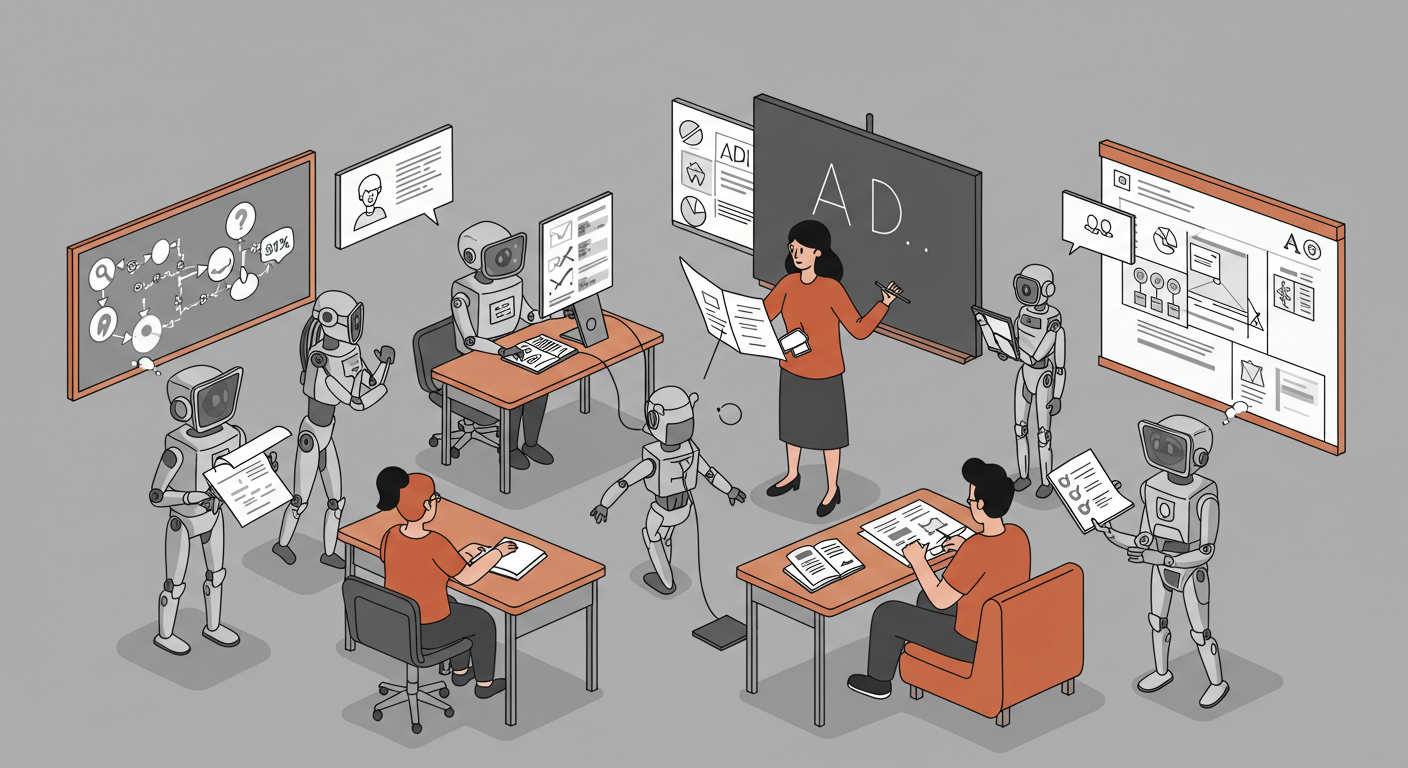
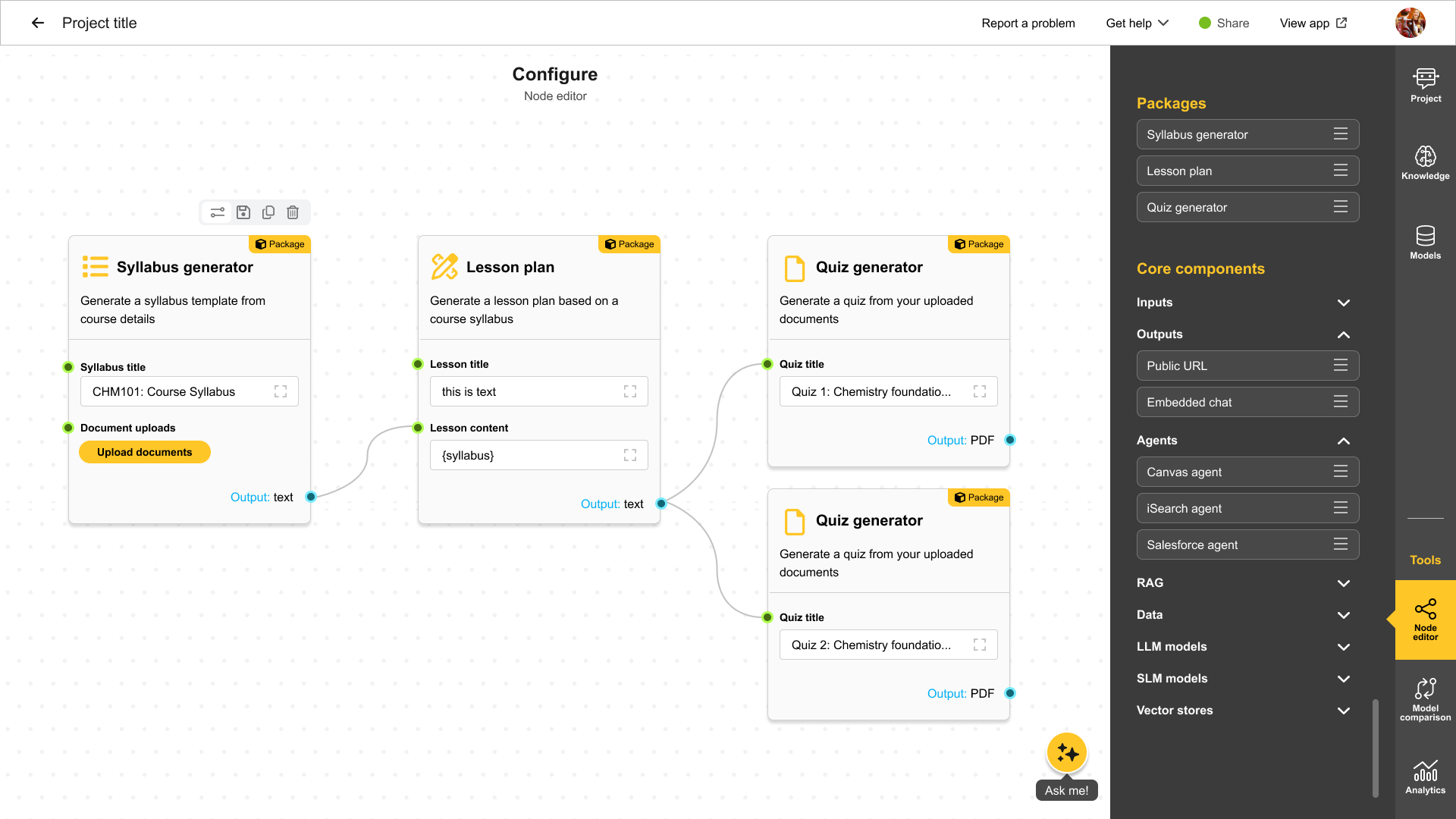
Now that we’ve explored the foundational concepts of agents, let's see how they come together in a real-world application with various roles. Imagine a Course Builder AI—a system designed to streamline and automate the course creation process. By leveraging specialized agents, this AI can efficiently draft course structures, generate learning materials, and manage approvals, all while ensuring alignment with institutional standards.
Here’s how these agents could contribute to the workflow:
Facilitator: Oversees other agents, maps out all the steps for drafting an ASU course, and manages the approval workflow for course creation.
Syllabus Creator: Creates a syllabus for the course given the outline Module Creator: Drafts a module based on the course content
Lecture Scripter: Develops lecture scripts and presentation flows
Assessment Creator: Designs specific assessments for each module based on its content.
Conceptual Workflow Builder
The Future of CreateAI and MyAI Builder
The future of AI-driven workflows moves beyond traditional interfaces, enabling more dynamic and integrated experiences. By leveraging advanced models, retrieving relevant data, and incorporating enterprise tools, this approach enhances automation, adaptability, and user interaction across multiple platforms. Below are key elements shaping this evolution:
Flow Builder Instead of a Form-Based UI
Stitch together multiple LLM models
Fetch data from multiple RAG indexes
Mix between multimodal models
Create & Integrate Agents into your flow
Enterprise Tools for Agents integrating Enterprise data sources (Canvas, iSearch, Salesforce, Data Warehouse etc)
Custom tools enabling integration of any external source
Seamless Navigation Across CreateAI Apps: Users can now seamlessly click on links within MAB to access other CreateAI Lab apps like Model Comparison and ASU GPT.
Updated all tooltips/help messages to user-friendly language including publishing project, enabling knowledge base.
Enabled LLM API output to a structured format for models that support it.
Enhanced MyAI Builder interface with improved user guidance on how to build an AI project.
Added new models to the platform: Gemini 2.0. Deprecated Gemini 1.0.
Fixed error with file upload toggle not saving.
Fixed errors with displaying math symbols in AI input/output.
How to Use Knowledge Base (RAG)
What is Knowledge Base?
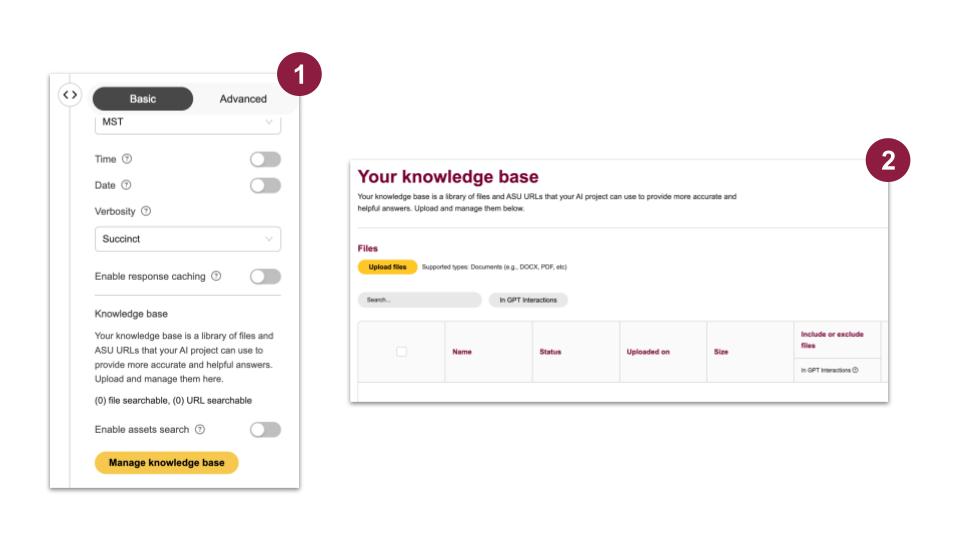
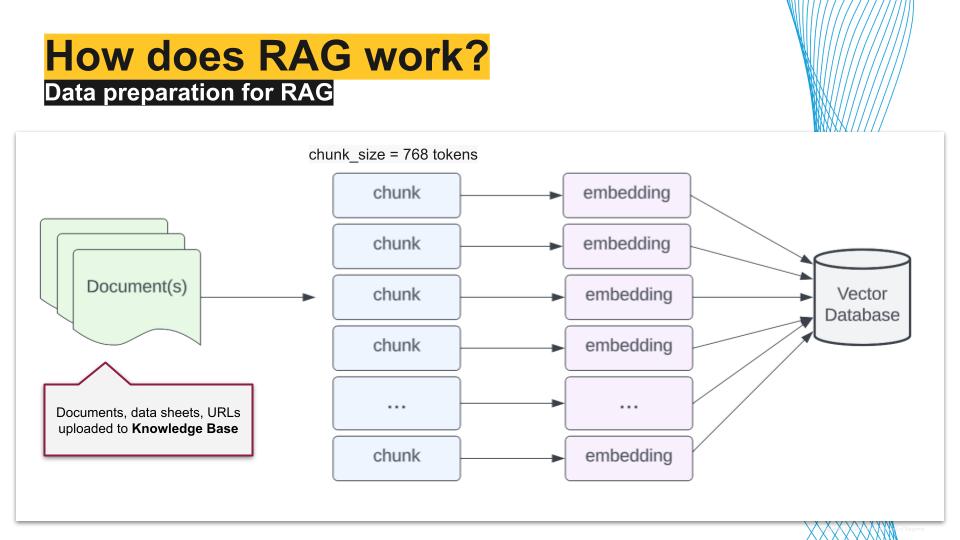
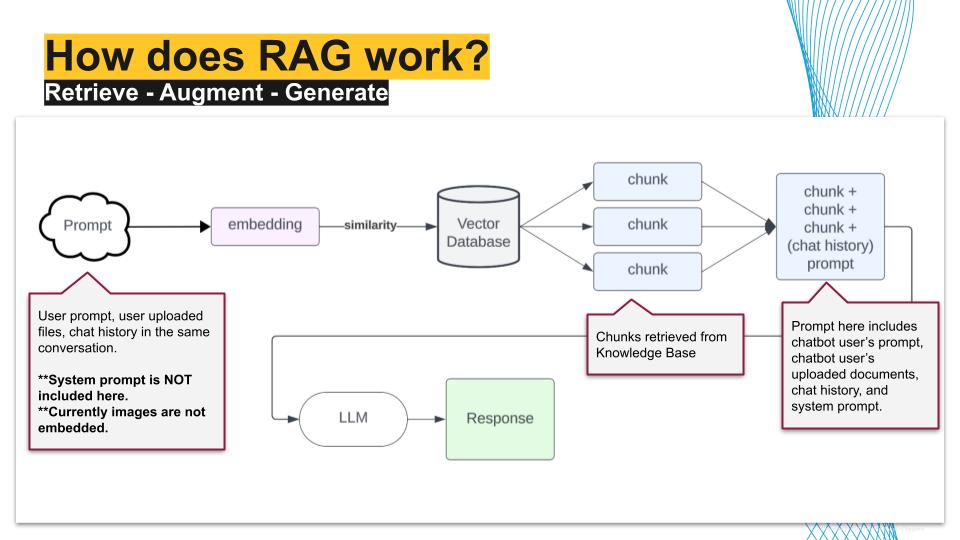
Knowledge Base is a library of files and URLs from which your AI bot can retrieve information. It helps to provide more accurate and helpful answers. Builders can upload and manage files here. It uses a framework called Retrieval Augmented Generation (RAG).
What is Retrieval Augmented Generation (RAG)?
Retrieval Augmented Generation (RAG) basically allows LLMs - which are trained on general knowledge from the Internet - to access your organization’s data and knowledge.
Knowledge Base Retrieval Types
Top K: A variable that setsthe number of top chunks to be retrieved. A higher 'K' value means more chunks are retrieved, which can improve accuracy but may slow down response time.
Retrieval type: This allows you to determine how information is retrieved from the selection in the dropdown
'Chunk' retrieves specific sections that are the most similar to the user prompt.
'Neighbor' retrieves related content that is most similar to the user prompt, and retrieves 1 chunk before and 1 chunk after.
'Document' retrieves the entire document for context.
When to use which retrieval method?
Chunk: This is best used when the answer to a user's query might be found in a small section of text within a larger document.
Neighbor: This is useful when LLM needs more context surrounding the direct answer to the user query.
Document: This works best when the user query requires LLM to understand the entire documents.
When experimenting with different retrieval methods, pay attention to quality of output, latency, and context window limit.
Improved Access Control for Private Bots: Private bots are now hidden from unauthorized users, and access is denied if permissions are not granted.
Enhanced Collaborator Management: Users can now search, filter, sort, and bulk-select collaborators in the Share Panel, making it easier to manage access and permissions efficiently.
Dynamic Model Management: Model configurations are now fetched from the backend, eliminating hardcoded constants and reducing manual updates for a smoother, more reliable experience.
Starred projects appears at the top of project list.
Automated Welcome Emails for New Users: New users now receive a welcome email upon gaining access to any CreateAI Toolkit product, providing login details, access links, and support resources for a seamless onboarding experience.
AI Help Button: Rolled out an in-app AI-powered Help Button for easier support and navigation assistance.
File Metadata Tracking: Enabled metadata extraction for up to 36 file formats, including DOCX (page numbers), PPTX (slide numbers), and CSV (row numbers).
Document Upload for Conversations in ASU GPT and MAB: Introduced the ability for users to upload documents or images exclusively for a single conversation. These uploads are temporary and do not persist in the Knowledge Base.
Skills & Jobs Matching: Introduced the ability for students to upload their resumes via the ASU Pockets API in the mobile app to receive a list of relevant skills based on their qualifications and experience.
Dynamic User Role Management: Launched an API for updating user roles via an intuitive dropdown interface, simplifying team role management.
Improved Sharing Management in MyAI Builder: Introduced a dedicated and easily accessible "Share" button in the app header, allowing users to efficiently manage project sharing permissions. Users can invite collaborators or viewers via ASURITE IDs, view existing permissions, and delete multiple accounts with confirmation prompts.
Improved Security Controls: Introduced stricter access controls to prevent unauthorized users from accessing ASU GPT environments.